Properly Configure Subdomains in opendkim.conf for DKIM Authentication on SMTP Servers Running with Subdomains like xx.darkstar.com!

Hello, this is Munou.
This is a DKIM episode that's been a headache.
For example, you can check DKIM on sites like the following:
Then, it might seem like it passed at first glance, like this.
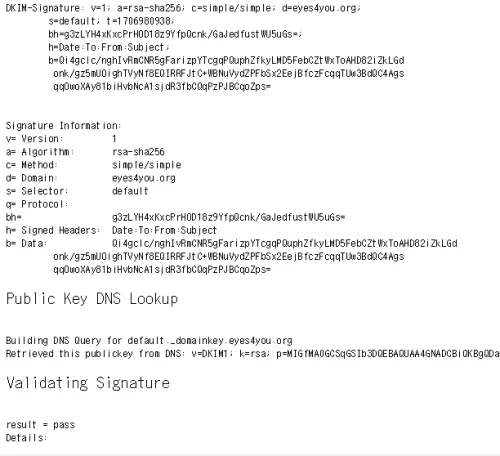
But even with this, it still gets flagged as spam!!!!
Why is that? When considering this, I think most people set up SMTP servers using subdomains like mx.darkstar.com.
Even if DKIM authentication for darkstar.com itself passes, and mail.darkstar.com also passes for cases like taro@darkstar.com, it seems like it's saying "Hey!!! DKIM authentication for mail.darkstar.com isn't working!!!"
Perhaps as long as you're getting errors for DKIM on the following site, your DKIM settings aren't configured correctly.
How do I configure it?!
Alright, I'll explain!
First, in my environment, since it's running on FreeBSD, the OpenDKIM configuration file is in the following directory:
/usr/local/etc/mail/opendkim.conf
Let's open it.
vi /usr/local/etc/mail/opendkim.conf
Add the following three lines in red. The purple text was already added somewhere else, so it's not in red, but please add it if it's missing.
Canonicalization simple/simple
Domain darkstar.com
KeyFile /var/db/dkim/darkstar.com.private
LogWhy yes
Mode sv
ReportAddress “DKIM Error Postmaster” postmaster@darkstar.com
Selector default
SendReports yes
Socket inet:8891@localhost
SubDomains yes
Syslog Yes
SyslogSuccess yes
UMask 002
InternalHosts /usr/local/etc/mail/TrustedHosts
SigningTable /usr/local/etc/mail/SigningTable
KeyTable /usr/local/etc/mail/KeyTable
So, let's create these three files one by one!
vi /usr/local/etc/mail/TrustedHosts
darkstar.com
mail.darkstar.com
OK.
vi /usr/local/etc/mail/SigningTable
darkstar.com default._domainkey.darkstar.com
mail.darkstar.com default._domainkey.darkstar.com
OK.
vi /usr/local/etc/mail/KeyTable
default._domainkey.darkstar.com darkstar.com:default:/var/db/dkim/darkstar.com.private
OK. Please note that the location of the DKIM key in red above should be changed according to your environment.
With this, it successfully passed in my case. So, the point is to properly configure subdomains.
However, there's also a catch!
"no signing table match" appears in opendkim on centos6.3
>Apparently, if you set SigningTable in /etc/opendkim.conf to SigningTable /etc/opendkim/SigningTable
>then you should configure it like testserver.com default._domainkey.testserver.com.
>Alternatively, if you set it to SigningTable refile:/etc/opendkim/SigningTable
>then you should configure it like *@testserver.com default._domainkey.testserver.com.
hogeeeeeeeeeeeeeee!!!
And that's where I got stuck once.
The end!
Thank you again.