Think Pad X395 on TrackPoint Keyboard II (KU-1255)

Hello, Munou here.
I recently noticed a really good combination.
TrackPoint, it has 100 colors.
Yes, I don't think you understand what I'm saying.
That's because my ThinkPad history originally was...
- Junior High School Student
- ThinkPad X60/X61
- ThinkPad X200
- High School Student
- ThinkPad X220/X230
- Adult
- ThinkPad X220/X230
- ThinkPad X250/X260
- Now
- ThinkPad X395
That's how it went, and the X200 didn't even have a touchpad to begin with.
Since I used the X230 with an X220 keyboard, I feel I had a certain attachment to keyboards.
X395
Currently, it's a ThinkPad X395. I bought it as junk because it was the only affordable Ryzen-powered ThinkPad X series available, and I've been using it ever since.
This one is actually quite good. The lightweight aspect, and the peach skin finish of older models is long gone, so there's a question of what this X series is even for, but the integrated graphics are decent for a laptop, and I think it's a user-friendly APU. For users looking for affordability, there are many available as corporate discards.
It's an 8GiB memory model, but you shouldn't be doing memory-intensive tasks on a laptop anyway, and if I only have a browser and CLI open, I have no problems.
Having both Type C and Type A USB ports is also quite good.
Power can be supplied via Type C, freeing me from the hassle of round or square connectors.
Recent Dissatisfaction I Noticed
I recently noticed this, but the TrackPoint is thin.
It wears out incredibly fast, it's soft, and I've become quite dissatisfied with it during operation. Well, I could just replace the TrackPoint's red nub, but I realized the shaft is also thin, and that might be annoying too.
Please excuse the mess.
X395 TrackPoint shaft
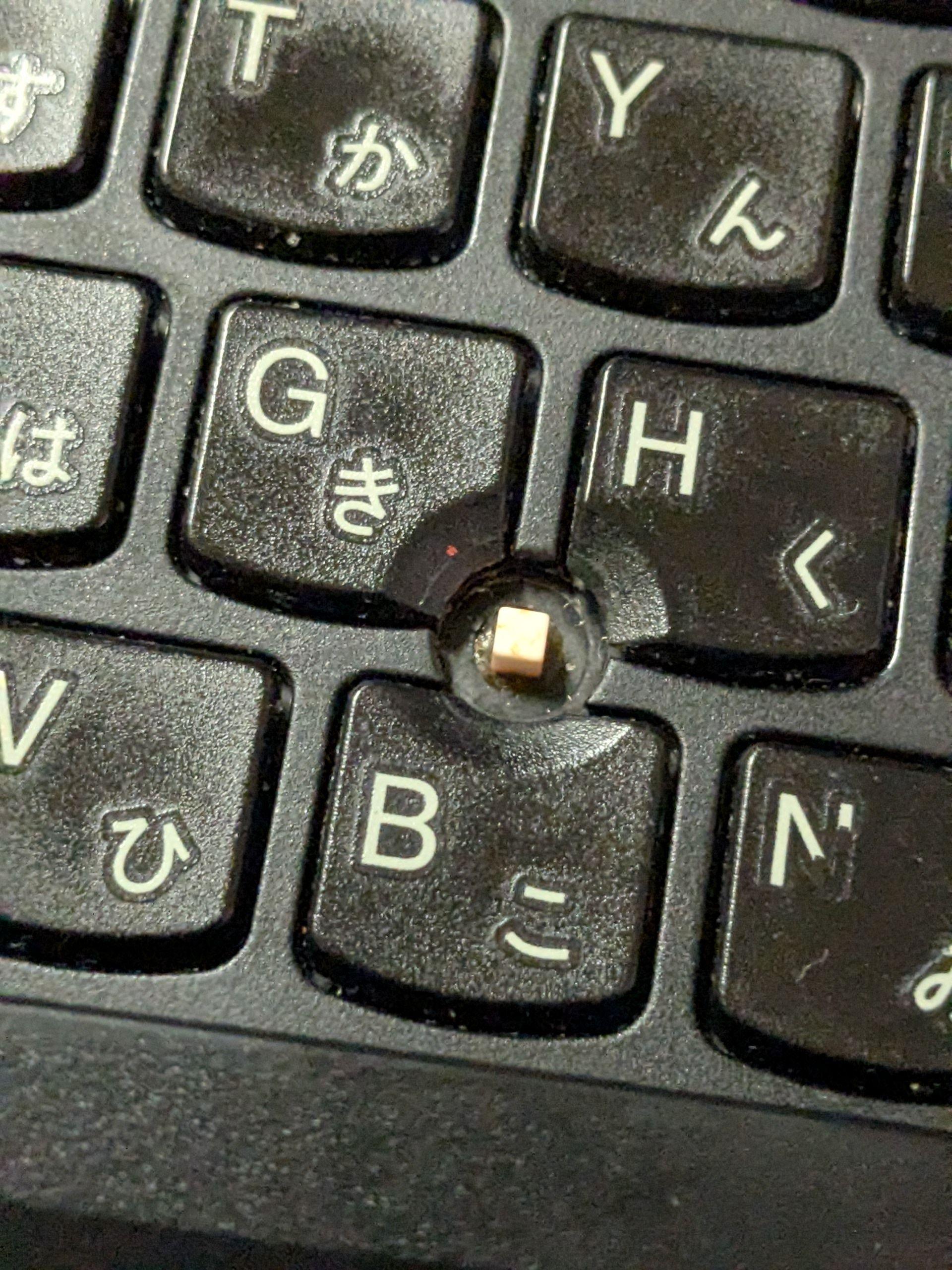
And then, it hit me.
Why not just attach an external TrackPoint keyboard?
I thought...
Am I a genius...?
TrackPoint Keyboard II

Look. The shaft thickness is completely different.
The stability is different.
It turns out all I had to do was attach the keyboard I use for work.
Byproduct
It's not so much a byproduct, but as you can see from the first image, when I placed the keyboard on top of the ThinkPad, the width was a perfect fit.
And the rubber feet are perfectly positioned on the bezel, so there's no problem even without disabling the X395's default keyboard. It's as if it was calculated...
The TrackPoint Keyboard II has a decent key travel, so the typing feel is also good.
Minor Complaints
When using the TrackPoint Keyboard II with my work MacBook, there are quite a few frustrating aspects.
Sometimes I think I might type faster just using the MacBook's built-in keyboard. I wonder why this is, but I really can't figure out the cause.
I keep thinking it's just a matter of getting used to it, but even after about a year, I still feel a sense of discomfort, or is there a subtle delay with the IME? If so, I should change the IME... I think now, but I can't use other IMEs from Google IME, and the standard macOS IME is a bit... well.
Maybe I should try changing the Mac's IME...
Bonus
Ivon's Blog
It seems they added me to their link collection! Thank you!