Rebuilding LumeCMS, a static site SSG, only when changes occur using inotifywait
Hello, this is Munou. Today, I completely migrated to LumeCMS. So, I'm documenting how I did it this time.
Separating Admin Pages
In LumeCMS, admin pages and regular pages are different. For example, if you run deno task lume cms and deno task serve with standard settings, both will be built into the default _site folder. What happens in this case is that when you edit an admin page, it's built to _site in real-time, and pages marked as "Draft" (private pages) are also built. If _site is the root directory and an HTTP server is started, even private articles become visible. This must be avoided. So, in my case,
/home/haturatu/.deno/bin/deno task lume cms --location=http://localhost:3001
I first set it up for CMS on localhost port 3001. Then, to allow editing from outside, I set up a reverse proxy on the Nginx side for http://localhost:3001 using a throwaway domain. This completes the admin page setup. 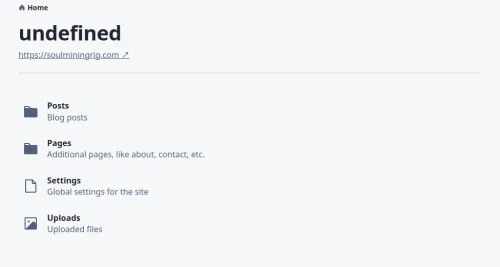
Now, regarding the public pages, if the build directory is separate, changes are not built in real-time. However, making the build a cron job would only waste resources and disk wear, which I want to avoid. Therefore, I will create a script that monitors the file system using inotify-tools(inotifywait) and executes a specified command when changes occur.
#!/bin/bash

WATCHED_DIR="/var/www/html/soulmining/src/" # Directory to monitor
COMMAND="/home/haturatu/.deno/bin/deno task lume --dest=site" # Command to execute --dest specifies build output
COOLDOWN_TIME=60  # Cooldown (sec)

# Record the last time the command was executed
LAST_RUN_FILE="/tmp/last_run.time"

# Get current time
current_time() {
    date +%s
}

# Get the last time the command was executed (returns 0 if not found)
get_last_run_time() {
    if [ -f "$LAST_RUN_FILE" ]; then
        cat "$LAST_RUN_FILE"
    else
        echo 0
    fi
}

# Record the last time the command was executed
set_last_run_time() {
    current_time > "$LAST_RUN_FILE"
}

inotifywait -m -r -e modify,create,delete "$WATCHED_DIR" | while read -r directory events filename; do
    echo "Change detected"
    last_run_time=$(get_last_run_time)
    now=$(current_time)

    # Determine whether to re-execute the command based on the last execution time
    if [ $((now - last_run_time)) -ge $COOLDOWN_TIME ]; then
        echo "Executing command"
        cd /var/www/html/soulmining || exit
        $COMMAND
        cd ~ || exit
        set_last_run_time
    else
        echo "Command not executed"
    fi
done
If you can confirm it's working, you might want to comment out the echo statements while it's running in the background, as they are unnecessary. Also, I added a cooldown because without it, the command would be executed for every changed file (e.g., vim swap files). While you can select files to exclude, I found this approach simpler and more reliable for catching all changes, so I adopted this specification. Create a file like chreload.sh and execute it with nohup sudo -u root chreload.sh &. Add it to rc.local as /my/dir/chreload.sh &. The src directory is where blog posts and CSS files are mainly changed, so detecting changes there should be sufficient. Additionally, what needs to be changed is the baseUrl, which is localhost by default, similar to Hugo, so it must be configured appropriately.
$ cat _config.ts
import lume from "lume/mod.ts";
import blog from "blog/mod.ts";
import plugins from "./plugins.ts";
import nunjucks from "lume/plugins/nunjucks.ts";
import basePath from "lume/plugins/base_path.ts";

const site = lume({
  src: "./src",
  location: new URL("https://soulminingrig.com"),
});

site.use(basePath());
site.use(plugins());
site.use(nunjucks());

export default site;
So, I've made it ready for publication without issues. Also, I was reluctant to start an HTTP server with Deno, so I'm using Apache to listen to the site directory (the part other than the admin CMS page) and then reverse proxying from Nginx (the public server) to Apache for publication. That's all for now. Thank you.