免费CDDB FreeDB 已关闭,因此我将使用 MusicRepair 和 Spotify API 自动获取标签。

大家好,我是无能。
以前我经常使用的 FreeDB 已经关闭了。
因此,我找到了 MusicRepair,它可以使用 Spotify API 自动获取标签,所以我就来使用它了。
Github
https://github.com/kalbhor/MusicRepair
可以使用 pip 进行安装。
pip3 install musicrepair
输入 musicrepair 后,首次启动时会提示需要 API 密钥!
Warning, you are missing the Spotify client ID. Add it using --config


Warning, you are missing the Spotify client secret. Add it using --config


Warning, you are missing the Genius key. Add it using --config


usage: musicrepair [-h] [-c] [-d REPAIR_DIRECTORY] [-R] [-r REVERT_DIRECTORY] [-n] [--format RENAME_FORMAT]

  __  __           _      _____                  _
 |  \/  |         (_)    |  __ \                (_)
 | \  / |_   _ ___ _  ___| |__) |___ _ __   __ _ _ _ __
 | |\/| | | | / __| |/ __|  _  // _ \ '_ \ / _` | | '__|
 | |  | | |_| \__ \ | (__| | \ \  __/ |_) | (_| | | |
 |_|  |_|\__,_|___/_|\___|_|  \_\___| .__/ \__,_|_|_|
                                    | |
                                    |_|

______________________________________________________________
|                                                            |
| Tries to find the metadata of songs based on the file name |
|                                                            |
| Update : pip install musicrepair -U                        |
|                                                            |
| https://github.com/lakshaykalbhor/MusicRepair              |
|____________________________________________________________|

options:
  -h, --help            show this help message and exit
  -c, --config          Add API keys to config

  -d REPAIR_DIRECTORY, --dir REPAIR_DIRECTORY
                        Specifies the directory where the music files are located

  -R, --recursive       Specifies whether or not to run recursively
                                                in the given music directory

  -r REVERT_DIRECTORY, --revert REVERT_DIRECTORY
                        Specifies the directory where music files
                                                that need to be reverted are located

  -n, --norename        Does not rename files to song title

  --format RENAME_FORMAT
                        Specify the title format used in renaming,
                                                these keywords will be replaced respectively:
                                                {title}{artist}{album}
所以,我将去获取 Spotify API。
一直以来,我与 Spotify 的兼容性都不太好,只是打开别人的播放列表就会陷入重定向循环,这次也一样,网站很卡,无法访问,所以我想我以后可能也不会再用了。也许他们把所有资源都投入到移动版 API 上了吧。
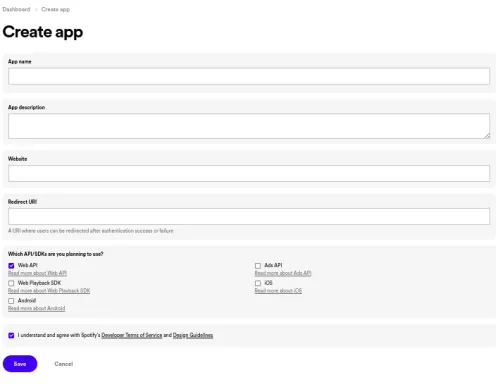
Redirect URI 说实话随便填什么都行,但因为是必填项,所以我输入了我另一个域名的网站。如果只是使用 API,我觉得填一个虚构的也可以。
然后,勾选 WebAPI 后会生成密钥,直接粘贴到 MusicRepair 中即可。
musicrepair --config
Enter Spotify client ID :这里是获取到的客户端密钥
Enter Spotify client secret :~密钥
接下来,它会要求提供 Genius API 密钥来获取歌词,所以我也去获取一下。
碰巧我一年前为了 AI 歌词翻译获取过 API 密钥,所以就直接用这个了。

我给 API 起的名字太随意了,自己都笑了。
Enter Genius key :输入 Genius 的 CLIENT ID
这样准备工作就完成了。
我希望它能递归地搜索目录,所以加上 -R 选项。
musicrepair -d 音乐文件夹 -R
这样它就会自动获取了。
我希望即使 SSH 会话断开也能在后台运行,
另外,如果尝试重命名,可能会因为包含特殊字符而报错?所以添加了不重命名的选项。
nohup musicrepair -d 音乐文件夹 -R -n &
就这样设置了。
那么。
下次再见。