Github-Gitea 似乎可以兼容地執行 Actions
大家好,我是無能。
我主要在做的是導入 Gitea Actions。
準備 Gitea Actions 的執行環境
我所做的與以下內容幾乎沒有區別
Gitea Actions 已經來了!
順帶一提,即使不在app.ini中將[actions]設定為ENABLED=true,它似乎也預設為開啟。
導入時的版本
$ gitea -v
Gitea version 1.22.4 built with GNU Make 4.3, go1.22.9 : bindata, sqlite, sqlite_unlock_notify
因為在 hetzner 上的 Debian 中使用apt安裝的Go版本太舊,導致建置時出錯,所以安裝最新版的Go。
wget https://go.dev/dl/go1.23.4.linux-amd64.tar.gz
tar -C /usr/local -xzf go1.23.4.linux-amd64.tar.gz
exec bash
go version
然後,此時雖然已經apt remove,但它仍然指向/usr/bin/go,而且我忘記設定路徑,所以現在設定路徑。
echo 'export PATH=$PATH:/usr/local/go/bin' >> ~/.bashrc
rm /usr/bin/go
exec bash
go version
建置 Gitea Actions 的執行器 (Runner)
需要作為另一個守護程序運行,並且也需要docker,所以將其安裝。
apt install -y make docker.io
service docker status

git clone https://gitea.com/gitea/act_runner
cd act_runner/
make build
mv ./act_runner /usr/local/bin
exec bash
使用 act_runner register 進行綁定
我大概在這個時候明白了將其與Gitea主程式的二進位文件分開的原因。
我想這可能是為了方便將執行Gitea Actions的環境與託管Gitea本身的伺服器分開。
# act_runner register
INFO Registering runner, arch=amd64, os=linux, version=v0.2.11+6-g8bc0275.
INFO Enter the Gitea instance URL (for example, https://gitea.com/):
https://git.domain.tld/
INFO Enter the runner token:
Secret key
INFO Enter the runner name (if set empty, use hostname: debian-2gb-hel1-1):
danzig
INFO Enter the runner labels, leave blank to use the default labels (comma-separated, for example, ubuntu-latest:docker://gitea/runner-images:ubuntu-latest):

INFO Registering runner, name=danzig, instance=https://git.domain.tld/, labels=[ubuntu-latest:docker://gitea/runner-images:ubuntu-latest ubuntu-22.04:docker://gitea/runner-images:ubuntu-22.04 ubuntu-20.04:docker://gitea/runner-images:ubuntu-20.04].
DEBU Successfully pinged the Gitea instance server
INFO Runner registered successfully.
順帶一提,獲取傳遞給 Runner 的令牌的方式與前面提到的網站不同,現在是
https://git.domain.tld/admin/actions/runners
。
雖然有點無聊,但我將 runner name 設定為 danzig,這是 Misfits 樂團主唱的名字。
因為想像格倫·丹齊格 (Glenn Danzig) 在幕後進行建置工作會很有趣。
似乎需要安裝 apparmor
看來缺少必要的模組。
似乎需要不同於SE Linux的Linux Security Modules。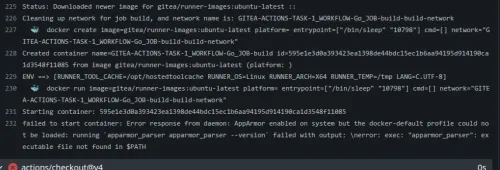
因此,我們將其安裝。
apt install -y apparmor apparmor-utils
關於 act_runner 守護程序的執行二進位文件問題,我暫時將其放入rc.local中,只讓它在啟動時運行,作為測試期間的解決方案。
原因是,如果一開始就將其放入Systemd或Supervisord中,當守護程序在運行途中崩潰時,檢查起來會很麻煩。所以,如果它能乾淨地崩潰,之後只需查看nohup.out中的守護程序崩潰日誌即可,這樣更容易找到問題。
將以下內容寫入/etc/rc.local
nohup act_runner daemon &
然後重新啟動Docker守護程序。
service docker restart
順帶一提,我幾乎不使用systemctl的原因是它具有通用性,在其他發行版和 BSD 環境中也能同樣使用。
編輯 yaml
老實說,我不太明白為什麼actions/checkout@v4在沒有明確指定的情況下也能運行,但查看日誌後發現,act_runner似乎巧妙地將其轉換為可理解的語法。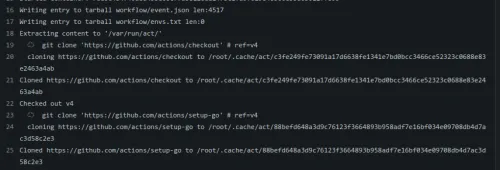
因此,它似乎不是使用act_runner端持有的任何actions/checkout@v4的鏡像資產,而是確實使用了 Github 上的資產。
# This workflow will build a golang project
# For more information see: https://docs.github.com/en/actions/automating-builds-and-tests/building-and-testing-go

name: Go

on:
  push:
    branches: [ "main" ]
  pull_request:
    branches: [ "main" ]

jobs:

  build:
    runs-on: ubuntu-latest
    steps:
    - uses: actions/checkout@v4

    - name: Set up Go
      uses: actions/setup-go@v4
      with:
        go-version: '1.23.3'

    - name: Build
      run: go build -v ./...

    - name: Test
      run: go test -v ./...
根據 Qiita 的文章,除了actions/checkout@v4之外,其他地方都需要明確指定完整的 URL,所以我為name: Set up Go的uses指定了完整的 URL。但如果按照前面所說的,現在版本已經升級,或許它也能巧妙地識別為 Github 資產?
我這麼想,但如果這樣做,可能會與Gitea上的資產發生衝突,所以完整指定 URL 似乎更不會出問題。
※補充
看來即使保持owner/repo@ref的格式,Github 和 Gitea 都能通過,所以應該可以不用考慮太多。
順利運行
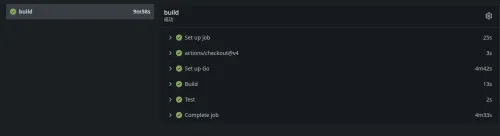
成功了!!!!
那麼,這次就到這裡。
下次再見了。