The journey to the intended Edge DNS implementation and obtaining an IP Anycast address - route64.org
Hello, I'm Munou.
I'm struggling to create an Edge DNS and CDN.
Current Status
It's a pseudo-distribution.
Registering pool.soulminingrig.com as a CNAME for edge.soulminingrig.com is intended to distribute it somehow... but currently, it's meaningless.
$dig www.soulminingrig.com AAAA +short
edge.soulminingrig.com.
pool.soulminingrig.com.
2400:8500:2002:3317:163:44:113:145
2a11:6c7:f07:156::2
$dig www.soulminingrig.com A +short
edge.soulminingrig.com.
pool.soulminingrig.com.
163.44.113.145
91.98.169.80For some reason, it's still delivered from the nearest server
Even so, in the case of HTTP, it's thanks to the client side, and what's amazing is that HTTP clients are actually designed to reach the nearest server. I don't know if the DNS server is distributing it well. I'm not sure if it's thanks to using ConoHa DNS because there's no information available regarding the detailed specifications.
From a server in Germany
IPv6:
# curl -I6s https://www.soulminingrig.com/ -vvv 2>&1 | head
01:36:56.631373 [0-x] == Info: [READ] client_reset, clear readers
01:36:57.350639 [0-0] == Info: Host www.soulminingrig.com:443 was resolved.
01:36:57.350725 [0-0] == Info: IPv6: 2a11:6c7:f07:156::2, 2400:8500:2002:3317:163:44:113:145
01:36:57.350801 [0-0] == Info: IPv4: (none)
01:36:57.350916 [0-0] == Info: [HTTPS-CONNECT] adding wanted h2
01:36:57.350949 [0-0] == Info: [HTTPS-CONNECT] added
01:36:57.350980 [0-0] == Info: [HTTPS-CONNECT] connect, init
01:36:57.351107 [0-0] == Info:   Trying [2a11:6c7:f07:156::2]:443...
01:36:57.351308 [0-0] == Info: [HTTPS-CONNECT] connect -> 0, done=0
01:36:57.351344 [0-0] == Info: [HTTPS-CONNECT] Curl_conn_connect(block=0) -> 0, done=0
IPv4:
# curl -I4s https://www.soulminingrig.com/ -vvv 2>&1 | head
01:38:31.901521 [0-x] == Info: [READ] client_reset, clear readers
01:38:32.847878 [0-0] == Info: Host www.soulminingrig.com:443 was resolved.
01:38:32.847999 [0-0] == Info: IPv6: (none)
01:38:32.848050 [0-0] == Info: IPv4: 91.98.169.80, 163.44.113.145
01:38:32.848139 [0-0] == Info: [HTTPS-CONNECT] adding wanted h2
01:38:32.848251 [0-0] == Info: [HTTPS-CONNECT] added
01:38:32.848315 [0-0] == Info: [HTTPS-CONNECT] connect, init
01:38:32.848440 [0-0] == Info:   Trying 91.98.169.80:443...
01:38:32.848657 [0-0] == Info: [HTTPS-CONNECT] connect -> 0, done=0
01:38:32.848723 [0-0] == Info: [HTTPS-CONNECT] Curl_conn_connect(block=0) -> 0, done=0
From my home environment
IPv6:
$curl -I6s https://www.soulminingrig.com/ -vvv 2>&1 | head
01:39:23.182757 [0-x] * [READ] client_reset, clear readers
01:39:23.227731 [0-0] * Host www.soulminingrig.com:443 was resolved.
01:39:23.227855 [0-0] * IPv6: 2400:8500:2002:3317:163:44:113:145, 2a11:6c7:f07:156::2
01:39:23.227996 [0-0] * IPv4: (none)
01:39:23.228072 [0-0] * [HTTPS-CONNECT] adding wanted h2
01:39:23.228171 [0-0] * [HTTPS-CONNECT] added
01:39:23.228253 [0-0] * [HTTPS-CONNECT] connect, init
01:39:23.228369 [0-0] *   Trying [2400:8500:2002:3317:163:44:113:145]:443...
01:39:23.228605 [0-0] * [HTTPS-CONNECT] connect -> 0, done=0
01:39:23.228711 [0-0] * [HTTPS-CONNECT] Curl_conn_connect(block=0) -> 0, done=0
IPv4:
$curl -I4s https://www.soulminingrig.com/ -vvv 2>&1 | head
01:40:52.285758 [0-x] * [READ] client_reset, clear readers
01:40:52.316059 [0-0] * Host www.soulminingrig.com:443 was resolved.
01:40:52.316177 [0-0] * IPv6: (none)
01:40:52.316239 [0-0] * IPv4: 163.44.113.145, 91.98.169.80
01:40:52.316340 [0-0] * [HTTPS-CONNECT] adding wanted h2
01:40:52.316440 [0-0] * [HTTPS-CONNECT] added
01:40:52.316522 [0-0] * [HTTPS-CONNECT] connect, init
01:40:52.316638 [0-0] *   Trying 163.44.113.145:443...
01:40:52.316822 [0-0] * [HTTPS-CONNECT] connect -> 0, done=0
01:40:52.316929 [0-0] * [HTTPS-CONNECT] Curl_conn_connect(block=0) -> 0, done=0
No matter how many times I try, it reaches the same nearest IP. Amazing.
I suspect that ConoHa DNS itself might be set up to deliver from the nearest IP address because it wouldn't work otherwise.
$dig a.conoha-dns.com +short
157.7.32.89
$dig b.conoha-dns.org +short
157.7.33.89
If ConoHa's primary and secondary DNS servers are configured and a.conoha-dns.com goes down, it's meaningless unless the query is made to b.conoha-dns.org. I wonder why I didn't realize this sooner, but rather, if one DNS server dies on the client side, there's no point in having a primary and secondary unless it can failover to the one that's still alive.
It's quite well-made... This means that even if multiple A records are registered, it's functioning in a sense.
Still, I want to distribute it even more
Actually, this alone is already sufficient, but if I can distribute it further, I could build my own distributed DNS or distributed CDN. Currently, if the cache servers at two locations go down, connectivity will be lost.
It's a bit overwhelming to think that major cloud providers built these distributed systems by investing overwhelming infrastructure and capital.
Thinking about easy distribution
If the goal is simply to avoid a single point of failure, you can broadcast the same IP address from multiple locations using IP Anycast. However, the prerequisite for that is having BGP set up, which presents high hurdles for an individual:
Obtaining an ASN
Obtaining the subnet values required for BGP setup
I don't feel like an individual can easily handle the costs or procedures for either.
In other words, if I can just skip all that and get an IP Anycast address, there's no problem.
However, I think using an IP address owned by a third party is generally bad manners.
route64.org
I found it.
It seems to be a non-profit organization working to promote IPv6.
However, while I haven't fully explored it yet, it seems that practically only the IPv6 Tunnel is free, and for others, it's a system where you receive points to use the services by donating. You can use those points for BGP or fully managed IP Anycast services.
Even though it costs money, it's impressive that you can get an Anycast address for just a few dollars. By the way, there seems to be a bandwidth limit, so keep that in mind.
Since it's strictly a tunnel, you can't actually own the address, though.
I was struggling because there were no resources covering it in the Japanese-speaking community.
I happened to want to add IPv6 to a Hetzner IPv4 server, so I gave it a try. By the way, adding an IPv6 address to a server that already has an IPv4 address on Hetzner costs an additional $1 per month. I thought, "They charge for IPv6 addresses...?" so I'm glad I didn't add one there.
Since it is actually an IPv6 Tunnel, you need to be careful about that point.
What's surprisingly convenient is using this route64 as a relay for VPSs with terrible response latency; if you issue this IPv6 address and use it as a relay between the SSH client and the SSH server, it becomes quite comfortable.
Trying out IPv6 Tunnel
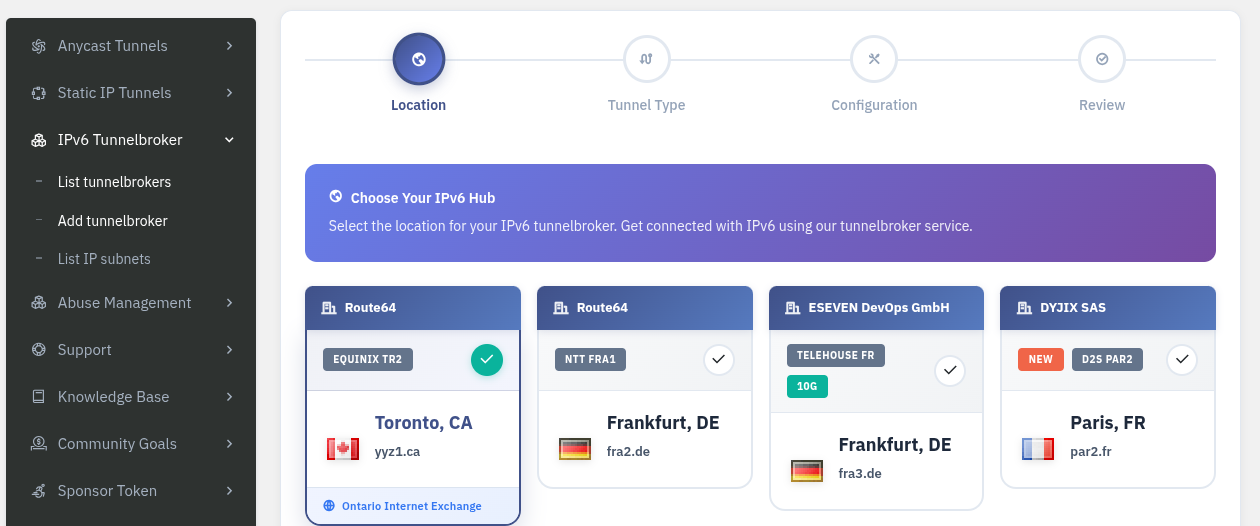
Select "add tunnelbroker" below:
Then select the tunneling method:
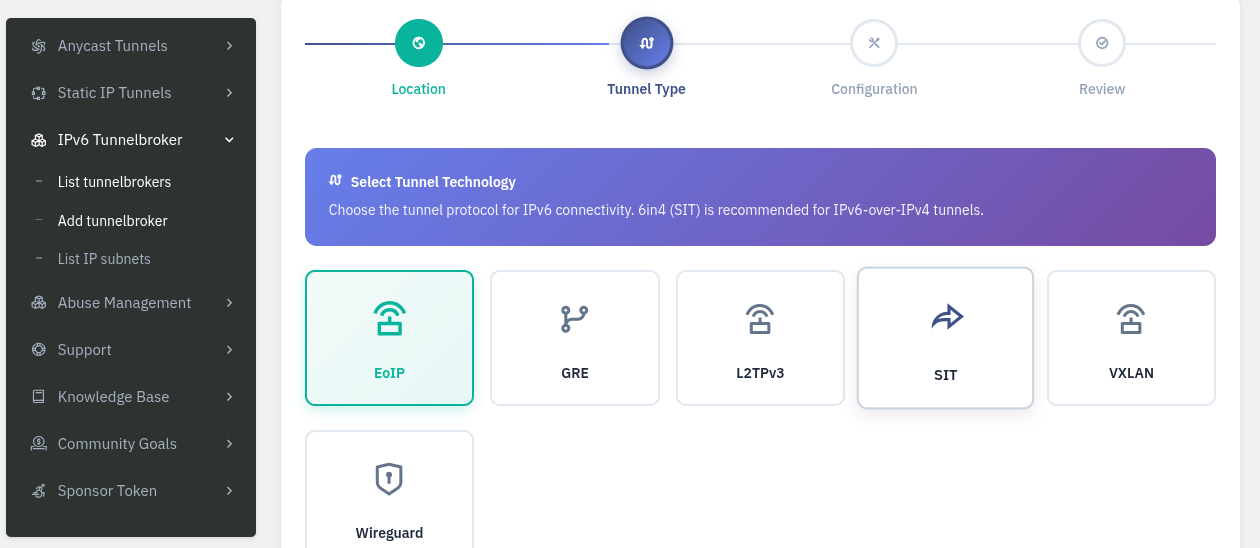
I chose WireGuard because it's easy and I already had it installed on my server.
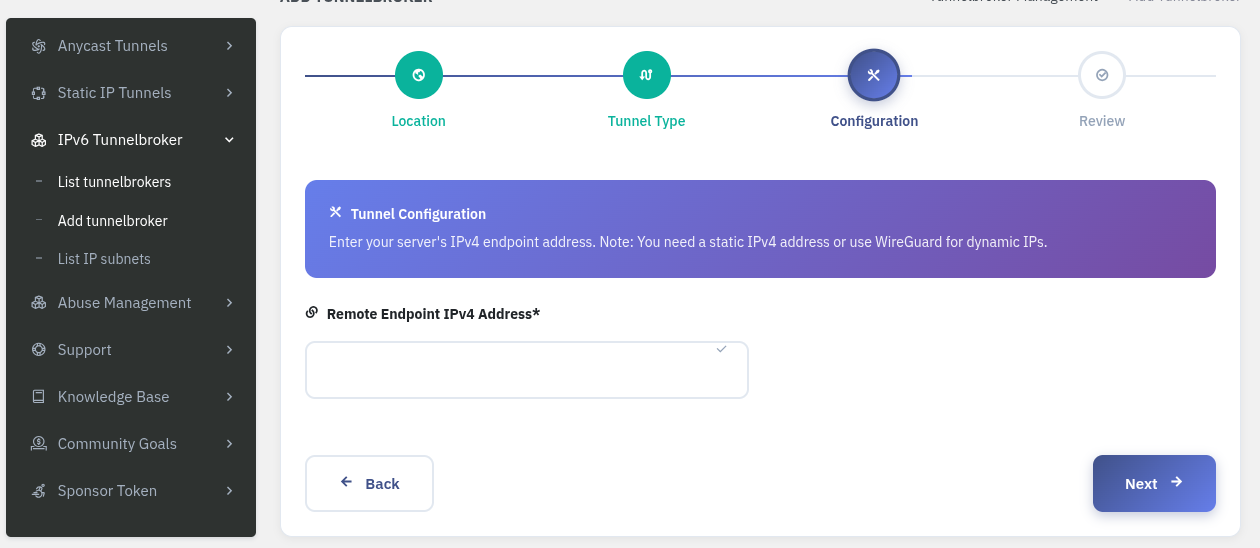
Now, add the IPv4 address of the server you want to assign IPv6 to.
In other words, this is the configuration for the WireGuard client side.
In my case, it's 91.98.169.80.
This will output the WireGuard configuration file, so all you have to do is wg-quick up conf-file.
Yes, as some of you may have noticed, the second IPv6 address in the AAAA record for this blog is the address obtained this way.
Anycast service is also available for IPv4
I had assumed it was only for IPv6 based on the service name, but it seems Anycast addresses also support IPv4. Impressive.
So, I'm thinking of trying to get an Anycast address soon.
Also, I haven't given up on obtaining an IPv4 subnet, so I'll need some time to research if there's a way to maintain it at a low cost.