~ Endless Eight ~ Migrating FreeBSD environment from Vultr to ConoHa while drunk ~ SigningTable that cannot be read with wildcards ~
Hello, this is a continuation from last time. The title says 'drunk,' but I'm not drunk anymore.
Can't reach Gmail!
Oh, I'm in trouble.
It's a struggle while watching tail -f /var/log/maillog...
opendkim[1853]: can’t load key from /var/db/dkim/eyes4you.org.private: Permission denied
Oh... it seems like a permission issue.
I forgot, but the default FreeBSD user for dmarc/dkim is mailnull.
root@localhost:/usr/local/etc # grep -r mailnull
./rc.d/opendmarc:opendmarc_runas=${opendmarc_runas-"mailnull:mailnull"}
./rc.d/milter-opendkim:: ${milteropendkim_uid:="mailnull"}
./rc.d/milter-opendkim:: ${milteropendkim_gid:="mailnull"}
./rc.d/milter-manager:: ${miltermanager_uid="mailnull"}
This means opendkim must be able to read the private key.
Since I made mistakes creating mail.eyes4you.org and eyes4you.org last time, I'll start fresh.
By the way, the previous settings were also incorrect, and the records registered with ConoHa were also wrong.
# opendkim-genkey -d eyes4you.org -s mail -D /var/db/dkim/
# cat /var/db/dkim/mail.txt # Add the content here to the TXT record
mail._domainkey IN      TXT     ( "v=DKIM1; k=rsa; "
          "p=MIGfMA0GCSqGSIb3DQEBAQUAA4GNADCBiQKBgQDFdu/VfVVHqUN84IZh739JVf8NW6HAmMBT3+NBcTmkwOGLQ4ye59wvN83CudtnHPKR9vdtL9kJusaWk6wm0HXtZ64dVkjZxg61vrwPWw25Pe1eAkrs8EkdqnCLfeHtsU2g7dBD+gjbJgOKdAhIocPQYQYio0kyMn8M/MlGP60eQQIDAQAB" )  ; ----- DKIM key mail for eyes4you.org
After that, grant permissions.
chown mailnull:mailnull /var/db/dkim/mail.private
chmod 600 /var/db/dkim/mail.private
It's simple.
This time, I only used a wildcard.
root@localhost:/usr/local/etc/mail # cat SigningTable
*@eyes4you.org mail._domainkey.eyes4you.org
root@localhost:/usr/local/etc/mail # cat KeyTable
mail._domainkey.eyes4you.org eyes4you.org:mail:/var/db/dkim/mail.private
root@localhost:/usr/local/etc/mail #
Now restart
service milter-opendkim restart
service postfix restart
tail -f /var/log/maillog
With this, I send emails, but no matter how many times I try, they still go to Gmail's spam folder...
Looking at the logs,
Sep 14 10:59:04 localhost opendkim[974]: B855A20079: no signing table match for 'hoge@eyes4you.org'
And it says that. I remember explicitly writing hoge@eyes4you.org in KeyTable because it got stuck on this...
But I want to use a wildcard.
I browsed several sites and finally found it.
I've seen this place before...
centos6.3 opendkim shows 'no signing table match' | CHOICE
If you have
SigningTable /etc/opendkim/SigningTable, you should set it liketestserver.com default._domainkey.testserver.com. Alternatively, if you haveSigningTable refile:/etc/opendkim/SigningTable, you should set it like*@testserver.com default._domainkey.testserver.com.
So,
root@localhost:/usr/local/etc/mail # cat opendkim.conf
##
## opendkim.conf -- configuration file for OpenDKIM filter
##
## Copyright (c) 2010-2015, The Trusted Domain Project.  All rights reserved.
##
Canonicalization        simple/simple
Domain                  eyes4you.org
LogWhy                  yes
Mode                    sv
ReportAddress           "DKIM Error Postmaster" <postmaster@eyes4you.org>
Selector                default
SendReports             yes
Socket                  inet:8891@localhost
SubDomains              yes
Syslog                  Yes
SyslogSuccess           yes
UMask                   002
InternalHosts           /usr/local/etc/mail/TrustedHosts
SigningTable            refile:/usr/local/etc/mail/SigningTable # ← Here
KeyTable                /usr/local/etc/mail/KeyTable
Check the logs
root@localhost:/usr/local/etc/mail # tail -f /var/log/maillog
~~~
Sep 14 12:14:52 localhost opendkim[3772]: 21A8E20293: DKIM-Signature field added (s=mail, d=eyes4you.org)
~~~
It's here~~~~!!!! Yes!
SPF record, getting yelled at...
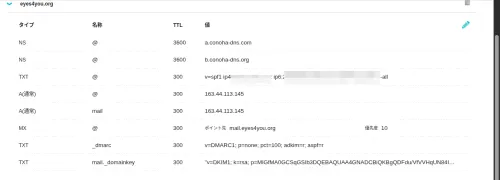
It seems that if IPv6 is enabled, I also needed to enable IPv6 in the SPF record.
Before, I completely disabled it due to performance concerns, but I don't care anymore, so I'll register it.
v=spf1 ip4:IPv4 here ip6:IPv6 here -all
By the way, I recently learned that when accessing IPv6 on a local host in a browser, you can open it by enclosing it in [ ], like http://[IPv6:address:here]:80.
There's no point in hiding it anymore, but it looks like this.
Exclude some WireGuard traffic from VPN
Services like OpenAI get angry with VPN communication, so I'll prevent them from using VPN.
cd /usr/local/
mkdir sh
cd sh
vim route.sh
Then enter the following
#!/usr/local/bin/bash

# Define domains in the list
DOMAINS=("chat.openai.com" )

# Default gateway
GATEWAY="In this case, the inet of vtnet0 from ifconfig"

# Get IP addresses for each domain and add routing
for DOMAIN in "${DOMAINS[@]}"; do
  # Get IP address of the domain
  IP_ADDRESSES=$(dig +short $DOMAIN | grep [0-9])

  # Add routing for each IP
  for IP in $IP_ADDRESSES; do
    route add $IP $GATEWAY
  done
done
However, be aware that IPv6 is also required this time.
Nginx
Nginx Log Rotation
I noticed while using Vultr's FreeBSD that there was no default log rotation, and logs were overflowing.
In FreeBSD, you can configure it in /etc/newsyslog.conf, so add the following:
/var/log/nginx/access.log   root:wheel  640  7     *    @T00  Z
/var/log/nginx/error.log    root:wheel  640  7     *    @T00  Z
Next, move the conf files. It's a hassle because ConoHa blocks Vultr, but I'll transfer them via the current machine.
thepassenger:[haturatu]:~/migrate-freebsd$ scp darkstar@vultr-freebsd:/home/darkstar/nginx.tar.gz .
nginx.tar.gz                                                             100%   14KB 167.8KB/s   00:00
thepassenger:[haturatu]:~/migrate-freebsd$ scp nginx.tar.gz root@conoha-freebsd:/root/
nginx.tar.gz                                                             100%   14KB 129.1KB/s   00:00
Delete the default /usr/local/etc/nginx and complete with mv.
The backend points to WireGuard's Internal IP, so it's fine to just point the WireGuard server to ConoHa on the client side.
However, since I plan to use ConoHa for NS this time, it's really troublesome. The pain of owning more than 10 domains is emerging...
Fortunately, ConoHa has released an API for changing DNS records, so I'd like to create something that can change DNS records all at once after this task is done.
Zone File Import|ConoHa Documentation Site
After that, I'll somehow send statically hosted files and the mail directory itself to ConoHa via my host machine... and done!
Finally, regarding fail2ban, I'll do that after confirming client-side communication with WireGuard. See you next time.