Alleycat: Rebuilt the Blog CMS
Hello, I'm incompetent.
I tried rebuilding my blog's CMS.
GitHub - haturatu/alleycat: cms & frontend · GitHub

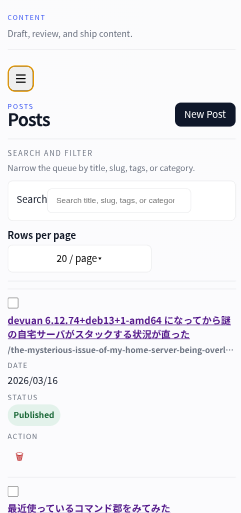

After all, if I was going to build this much, I do have the thought that WordPress might have been fine.
Why I built it
My blog, which originally migrated from WordPress to LumeCMS around 2020, had the following original migration intentions:
WordPress
Consumes a fair amount of memory
Hosting MySQL just for a personal blog is overkill
Feature extensions are entirely reliant on plugins
CSSand similar tend to become chaoticDifficult to manage securely without being able to separate the
admindirectory by portIt was very easy to paste images directly
Unnecessary resources are generated, such as thumbnail-sized reduced images for all images
LumeCMS
Consumes a fair amount of memory
As an SSG CMS, rebuilding everything for every single article update was not eco-friendly
Cannot upload images directly by copy-pasting
Its simplicity was extremely good
In practice, writing only in
markdowncaused no problems, but updating from a smartphone was quite difficult at times
It's like the above.
Requirements
So, the necessary requirements are as follows:
Ability to separate the CMS itself by port
Image upload by copy-pasting, and link generation
Design that is easy to edit even from a smartphone
Keep CSS to a minimum, as long as it's barely understandable
Ultimately, it's inevitable that it will increase
If external dependent CSS increases, it becomes incomprehensible, so I want to avoid it as much as possible
Make the frontend viewable without JS
Static Build is essential for performance, and I also wanted to make it user-friendly for
w3musers, which I still occasionally use
TOC is essential
Just having this makes a huge difference in readability
However, I wondered why
Lume's TOC itself used to start fromh2? But I can somewhat understand that the title equivalent is not included in theTOC.But for some reason,
Lumeonly covered up toh3?Perhaps because it makes the design more prone to breaking?
An editor with Rich Editor and
mdwould be convenientFor editing from a smartphone
Realizing the value of a DB now
Regarding the implementation
Personally, I found Pocketbase to be very easy to use, so I adopted it. Data backups can also be saved as a zip file from the standard Web UI without needing to implement them separately.
Handling sensitive information is also very easy, as Pocketbase implements it appropriately. The DB seems to be SQLite.
Also, I wanted to implement multilingual support, but the hurdle was always too high, so I decided to enable it by registering the Gemini API.
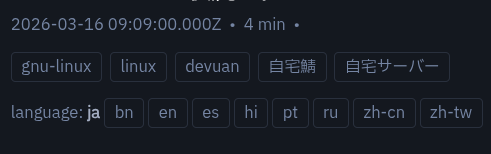
Even with Google Translate, you have to bother moving to the top of the browser and pressing the translate button, and after looking at various documentation pages, I still thought it would be better to have it. However, it's only for article pages.
If I change it that much, will it change as a blog site? Or rather, I'm curious from which country's perspective the blog author is writing, so I want to make it more like an About page for Japanese people, and I didn't feel the need for it on other pages.
Inode count, or rather, disk I/O issues
SSG also faces similar problems, and disk I/O is heavily scanned when the number of files after building increases. Well, putting aside the retort that articles won't increase until inodes are exhausted, I don't want to increase unnecessary disk r/w operations.
Regarding this, the public data after building doesn't actually require that much persistence. Therefore,
$ rg tmp
backend/ssr/config.go
13:     staticExportDir  = getEnv("STATIC_EXPORT_DIR", "/tmp/alleycat-static")
By outputting to /tmp by default in this way, the statically built files are placed in RAM and served.
Image data storage location
Basically, I wanted to be able to copy-paste and upload from the web editor, and also, as much as possible, for the export itself to easily maintain consistency between articles and image sets, so I decided to directly put the binaries into Pocketbase.
There are some points where I wonder if this is the right approach, but I never really looked at the folder where images are stored, and it's to eliminate complexity. Also, I did it this way because I could benefit from easier verification on Pocketbase.
Final Resources: Under 500MiB

I feel like it turned out pretty well.
When building, it looks like the image above, but this is roughly the standby resource. It generally converges to around 150MiB or less.
It was good that I could implement it with these resources, including the CMS, and I also wanted to try out how much I could refine the frontend design with Codex, so I think it was a good experiment.
That's all for now. Best regards.