Notes on ThinkPad X240~X280 SVP Unlock
The method of shorting the EEPROM with a screwdriver, which was effective up to the X230 series, has become obsolete as EEPROM is no longer used and data is now saved in the BIOS (?). I gathered some information before I tried it myself, while waiting for the SPI Writer to arrive, so I'll summarize it here.
How it started
I had experience unlocking X220s and X60s, so I thought it would be fine.
→ Disassembled X250
→ No EEPROM chip...?
Game over!
So, I decided to research how to bypass SVP.
This information from an overseas thread is quite useful, and it also provides a tool to modify the BIOS for SVP Bypass.
https://www.badcaps.net/forum/showthread.php?t=87588
Steps
-
Disassemble and check the BIOS chip.
Also, this type of chip is usually located near the power supply section, often close to the internal battery connector.
Below is the BIOS chip of the X250.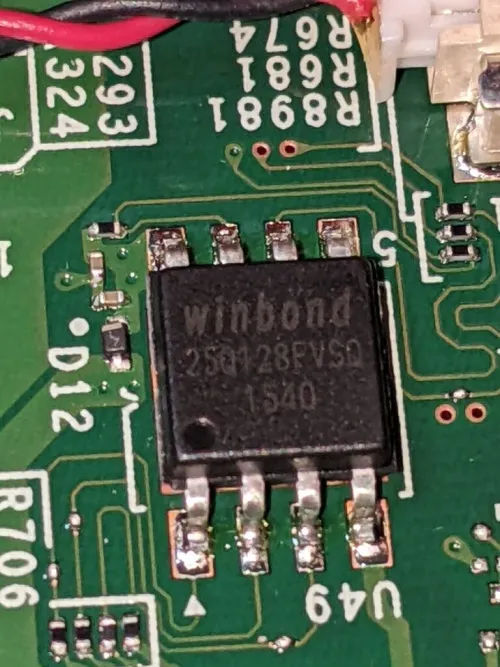
-
Extract the SVP-enabled BIOS with a CH341A SPI writer (extract it twice just in case, as the data might not be extracted correctly).
-
Generate the unlock BIOS using "lenovo_autopatcher" distributed in the Badcaps thread.
-
Flash it with the SPI writer.
-
Enter your desired password on the password prompt screen.
At this point, the entered password will be saved and overwritten. -
Save BIOS and restart.
-
Disable SVP in the BIOS screen.
Complete
I believe this is the process.
And, if you flash a BIOS that you just picked up, or one that is not for bypass, it seems that the system will no longer boot due to a lack of consistency with the TPM chip.
In essence, this part seems to be similar to the EEPROM shorting method, where you skip the password once, then overwrite it, and then unlock it. The method doesn't seem to have changed.
I will update and edit this again once I've done it.
Viva ☆ Password-free life! (*^^*)