Q - I want to build a Git server with free tier GCP - Nginx SSH Proxy Edition -
Hello, I'm incompetent.
This is a sequel to Ha.
Cannot Push with SSH as is
Current structure
Client side - VPS VPN srv + Nginx proxy srv - GCP Gitea
I want to pass SSH through the VPS to GCP like this.
Well, I was wondering what to do, but I've solved it.
I remembered the stream proxy that I tried to use when I attempted email proxying with Nginx in the past.
In short, it's easy to proxy protocols other than HTTP/HTTPS.
However, in this case, it's an image of communication between IP and port, so it cannot proxy for domains.
That being said, it's quicker to just look at the syntax for now.
stream {
    server {
        listen 2222;
        proxy_pass 10.1.0.6:2222;
        proxy_timeout 1m;
        proxy_connect_timeout 1s;
    }
}
This server listens on port 2222 and accepts connections, then proxies them to port 2222 of the IP address 10.1.0.6.
The reason why it cannot be done on a domain basis is explained in more detail in this Issue, so please check it if you're interested.
So, for example, what would happen if we proxied port 22?
stream {
    server {
        listen 22;
        proxy_pass 10.1.0.6:2222;
    }
}
Yes, if you try to SSH to this server on port 22, all connections will attempt to SSH to 10.1.0.6:2222.
If this running server is configured with the standard port 22, it would effectively make SSH connections impossible, which is not good.
If that happens, I wonder if there's a workaround? But let's put that aside for now...
So, I need to enable listening on port 2222, so this FreeBSD server opens port 2222 with pf for now.
pass in on wg0 proto tcp from 10.1.0.6 to any port 2222
With this, if the attacker cannot see the IP address 10.1.0.6 in the first place, this routing won't be applied, so they won't be able to reach port 2222 unless WireGuard itself is hacked.
Apply settings
doas pfctl -nf /etc/pf.conf
doas pfctl -f /etc/pf.conf
doas service nginx restart
Then, on the Gitea side as well
By default, Gitea uses the standard SSH port 22, so it won't work as is.
Therefore, I will edit the configuration file app.ini.
[server]
SSH_DOMAIN = git.mydomain.jp
DOMAIN = git.mydomain.jp
HTTP_PORT = 3000
ROOT_URL = https://git.mydomain.jp/
APP_DATA_PATH = /var/lib/gitea/data
DISABLE_SSH = false
SSH_PORT = 2222
Now it will use port 2222 by default.
Restart with the following
sudo service gitea restart
sudo service gitea status
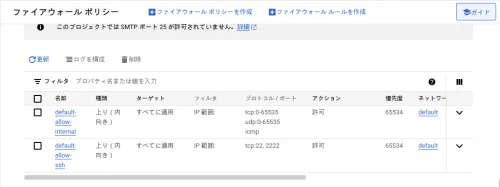
Tighten the Firewall on GCP
It was annoying, so I almost closed it completely.
Test if git push works with Gitea
First, I'll do ssh -T.
$ ssh -T -p 2222 git@git.mydomain.jp
Hi there, haturatu! You've successfully authenticated with the key named x1@artix, but Gitea does not provide shell access.
If this is unexpected, please log in with password and setup Gitea under another user.
It worked.
Then, I'll try creating a repository on Gitea.
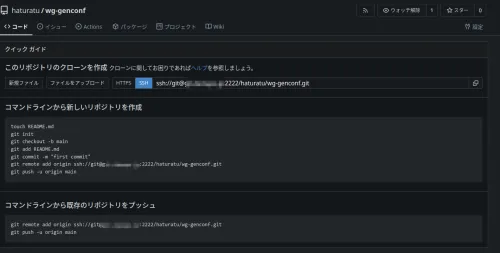
And then, git push
$ git push -u origin main
Enumerating objects: 4, done.
Counting objects: 100% (4/4), done.
Delta compression using up to 4 threads
Compressing objects: 100% (3/3), done.
Writing objects: 100% (4/4), 1.30 KiB | 1.30 MiB/s, done.
Total 4 (delta 0), reused 0 (delta 0), pack-reused 0 (from 0)
remote: . Processing 1 references
remote: Processed 1 references in total
To ssh://git.mydomain.jp:2222/haturatu/wg-genconf.git
 * [new branch]      main -> main
branch 'main' set up to track 'origin/main'.
Awesome!!!!!!
Conclusion
If anyone wants an account, please contact me and I'll create one for you.
End.