Introducción - Quiero construir un servidor Git en la capa gratuita de GCP
Hola, soy un inútil.
Me conecté a GCP en sí, ¿después de mucho tiempo?
Parece que el último proyecto que creé fue en 2016...
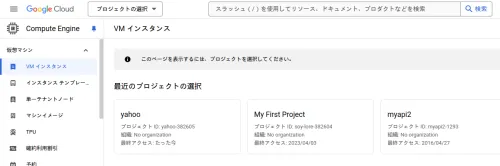
Parece que se actualiza al acceder, así que creo que My First Project es de mucho antes...
Espera, ahora es 2024, así que hace 8 años... ¡¡¡Tenía 15 años!!!!
El paso del tiempo es cruel.
Siento que he crecido, pero también que he involucionado en algunos aspectos... No, la involución también implica evolución. Seamos positivos.
Como nota al margen, después de comer una deliciosa comida el viernes, me siento con ganas de holgazanear.



Introducción
También tengo una cuenta OCI, pero fallé al elegir la región al registrarme por primera vez y la dejé abandonada durante más de medio año. Incluso cuando la reviso de vez en cuando, los recursos de la capa gratuita nunca están disponibles.
Es más, por alguna razón, soy el único a mi alrededor que no puede usarla... Pensé que las regiones menos populares tendrían más recursos disponibles, ¡y me registré, pero fracasé estrepitosamente!
También usaré el ecosistema de Google en el trabajo, así que aprovecharé esta oportunidad para configurar un servidor Git en GCE.
Además, hay otra razón: creo que tener un servidor Git fuera de casa facilitaría la copia de seguridad de los datos. En cuanto a la red, si solo lo uso yo, no parece que me cobren, y la razón por la que no había usado GCP hasta ahora es esta ↓
La capa gratuita de Google Cloud Platform (GCP) incluye 1 GB de tráfico de red de salida.
Esto es bastante problemático. De hecho, muy problemático. Sin embargo, si solo lo uso como un servidor Git personal, no parece que deba preocuparme tanto, así que lo había estado pensando vagamente y planeaba hacerlo cuando tuviera tiempo libre.
Quiero usarlo completamente gratis
Este tipo de sistemas de pago se vuelven más confusos cada año, así que es mejor seguir a quienes actualizan constantemente el conocimiento sobre cómo usarlo completamente gratis. Sus explicaciones detalladas son realmente útiles.
Aunque no parece que la interfaz de usuario haya cambiado mucho desde antes, es más probable que mi memoria simplemente sea débil.
Crear una instancia de VM en la capa gratuita de GCP
Construcción de un servidor utilizando la capa gratuita de Google Cloud Platform (GCP)
Creación rápida de usuario
Como el nombre de usuario predeterminado de la cuenta de Google es un poco extraño, cambiaré a root, crearé un usuario y lo configuraré para que pueda usar SSH.
root@git-srv1:~# adduser haturatu
Adding user `haturatu' ...
Adding new group `haturatu' (1002) ...
Adding new user `haturatu' (1002) with group `haturatu (1002)' ...
Creating home directory `/home/haturatu' ...
Copying files from `/etc/skel' ...
New password:
Retype new password:
passwd: password updated successfully
Changing the user information for haturatu
Enter the new value, or press ENTER for the default
        Full Name []:
        Room Number []:
        Work Phone []:
        Home Phone []:
        Other []:
Is the information correct? [Y/n]
Adding new user `haturatu' to supplemental / extra groups `users' ...
Adding user `haturatu' to group `users' ...
root@git-srv1:~# usermod -aG sudo haturatu
root@git-srv1:~# su - haturatu
haturatu@git-srv1:~$
Configuración de SSH
haturatu@git-srv1:~$ vim .ssh/authorized_keys
haturatu@git-srv1:~$ chmod 600 .s
.ssh/                      .sudo_as_admin_successful
haturatu@git-srv1:~$ chmod 600 .ssh/authorized_keys
haturatu@git-srv1:~$ chmod 700 .ssh
haturatu@git-srv1:~$
haturatu@git-srv1:~$ sudo service sshd restart
Configuración del firewall
haturatu@git-srv1:~$ sudo apt install ufw
Reading package lists... Done
Building dependency tree... Done
Reading state information... Done
The following NEW packages will be installed:
  ufw
0 upgraded, 1 newly installed, 0 to remove and 0 not upgraded.
Need to get 168 kB of archives.
After this operation, 878 kB of additional disk space will be used.
Get:1 file:/etc/apt/mirrors/debian.list Mirrorlist [30 B]
Get:2 https://deb.debian.org/debian bookworm/main amd64 ufw all 0.36.2-1 [168 kB]
Fetched 168 kB in 0s (1133 kB/s)
Preconfiguring packages ...
Selecting previously unselected package ufw.
(Reading database ... 68496 files and directories currently installed.)
Preparing to unpack .../archives/ufw_0.36.2-1_all.deb ...
Unpacking ufw (0.36.2-1) ...
Setting up ufw (0.36.2-1) ...

Creating config file /etc/ufw/before.rules with new version

Creating config file /etc/ufw/before6.rules with new version

Creating config file /etc/ufw/after.rules with new version

Creating config file /etc/ufw/after6.rules with new version
Created symlink /etc/systemd/system/multi-user.target.wants/ufw.service → /lib/systemd/system/ufw.service.
Processing triggers for rsyslog (8.2302.0-1) ...
Processing triggers for man-db (2.11.2-2) ...
haturatu@git-srv1:~$ sudo ufw allow 22/tcp
Rules updated
Rules updated (v6)
haturatu@git-srv1:~$ sudo ufw reload
Firewall not enabled (skipping reload)
haturatu@git-srv1:~$ sudo ufw enable
Command may disrupt existing ssh connections. Proceed with operation (y|n)? y
Firewall is active and enabled on system startup
haturatu@git-srv1:~$ sudo ufw reload
Firewall reloaded
¡A SSH!
Ya había puesto la clave en vim .ssh/authorized_keys, así que ahora solo tengo que hacer SSH desde mi PC cliente (el portátil que estoy usando).
alleycat:[haturatu]:~$ ssh -l haturatu gce-global-ip
The authenticity of host 'nyao-n' can't be established.
ED25519 key fingerprint is SHA256:nyannyan
This key is not known by any other names.
Are you sure you want to continue connecting (yes/no/[fingerprint])? yes
Warning: Permanently added 'nyannyan' (ED25519) to the list of known hosts.
Linux git-srv1 6.1.0-27-cloud-amd64 #1 SMP PREEMPT_DYNAMIC Debian 6.1.115-1 (2024-11-01) x86_64

The programs included with the Debian GNU/Linux system are free software;
the exact distribution terms for each program are described in the
individual files in /usr/share/doc/*/copyright.

Debian GNU/Linux comes with ABSOLUTELY NO WARRANTY, to the extent
permitted by applicable law.
haturatu@git-srv1:~$ uname -a
Linux git-srv1 6.1.0-27-cloud-amd64 #1 SMP PREEMPT_DYNAMIC Debian 6.1.115-1 (2024-11-01) x86_64 GNU/Linux
¡Terminé rápidamente!
Y, como pegué muchas cosas, se hizo largo, así que continuará en la siguiente parte.