序 - 在GCP免費額度中建立Git伺服器
您好,我是無能。
不知為何,我好久沒登入GCP本身了?
看來我最後一個建立的專案是在2016年...
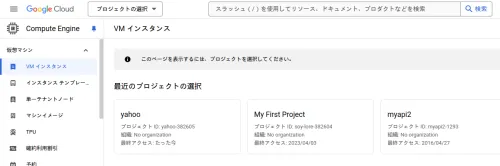
看來只要存取就會更新,所以My First Project感覺更久遠了...
話說,現在是2024年,所以是8年前... 那時我才15歲啊!!!!。
時光流逝是殘酷的。
感覺有所成長,但也有退步的地方... 不,退化也包含進化的意義。讓我們積極一點吧。
題外話,星期五吃了美味的飯菜後,就想懶洋洋地度過。



前言
我也有OCI帳戶,但最初註冊時選錯了區域,放置了半年以上?偶爾查看,免費額度的資源總是不足。
話說,不知為何周圍只有我無法使用... 我想說大概是小眾區域資源會比較多吧!結果註冊後就順利地失敗了。
工作上也會用到Google生態系,所以趁這個機會我想在GCE上建立一個Git伺服器。
另外還有一個原因,我只是覺得把Git伺服器放在家裡以外的地方,資料備份會比較容易。關於網路,如果只有我自己使用,應該不會被收費,而我之前沒有使用GCP的原因是這個↓
Google Cloud Platform(GCP)的免費額度包含1GB的輸出網路流量。
這相當麻煩。或者說是非常麻煩。但是,如果只是作為個人使用的Git伺服器,似乎也不用太在意,所以我只是在腦中模糊地想著,打算有空的時候再做。
因為想完全免費使用
這類型的收費服務每年都變得越來越難懂,所以每次都應該參考那些更新完全免費知識的人。他們詳細的說明真的很有幫助。
話雖如此,我也覺得UI方面和以前沒有太大變化,但更有可能只是我的記憶模糊了。
在GCP免費額度中建立VM實例
活用Google Cloud Platform(GCP)免費額度建立伺服器
快速建立使用者
畢竟使用Google帳戶預設的使用者名稱感覺不太舒服,所以我要切換到root建立使用者並設定好SSH。
root@git-srv1:~# adduser haturatu
Adding user `haturatu' ...
Adding new group `haturatu' (1002) ...
Adding new user `haturatu' (1002) with group `haturatu (1002)' ...
Creating home directory `/home/haturatu' ...
Copying files from `/etc/skel' ...
New password:
Retype new password:
passwd: password updated successfully
Changing the user information for haturatu
Enter the new value, or press ENTER for the default
        Full Name []:
        Room Number []:
        Work Phone []:
        Home Phone []:
        Other []:
Is the information correct? [Y/n]
Adding new user `haturatu' to supplemental / extra groups `users' ...
Adding user `haturatu' to group `users' ...
root@git-srv1:~# usermod -aG sudo haturatu
root@git-srv1:~# su - haturatu
haturatu@git-srv1:~$
SSH設定
haturatu@git-srv1:~$ vim .ssh/authorized_keys
haturatu@git-srv1:~$ chmod 600 .s
.ssh/                      .sudo_as_admin_successful
haturatu@git-srv1:~$ chmod 600 .ssh/authorized_keys
haturatu@git-srv1:~$ chmod 700 .ssh
haturatu@git-srv1:~$
haturatu@git-srv1:~$ sudo service sshd restart
防火牆設定
haturatu@git-srv1:~$ sudo apt install ufw
Reading package lists... Done
Building dependency tree... Done
Reading state information... Done
The following NEW packages will be installed:
  ufw
0 upgraded, 1 newly installed, 0 to remove and 0 not upgraded.
Need to get 168 kB of archives.
After this operation, 878 kB of additional disk space will be used.
Get:1 file:/etc/apt/mirrors/debian.list Mirrorlist [30 B]
Get:2 https://deb.debian.org/debian bookworm/main amd64 ufw all 0.36.2-1 [168 kB]
Fetched 168 kB in 0s (1133 kB/s)
Preconfiguring packages ...
Selecting previously unselected package ufw.
(Reading database ... 68496 files and directories currently installed.)
Preparing to unpack .../archives/ufw_0.36.2-1_all.deb ...
Unpacking ufw (0.36.2-1) ...
Setting up ufw (0.36.2-1) ...

Creating config file /etc/ufw/before.rules with new version

Creating config file /etc/ufw/before6.rules with new version

Creating config file /etc/ufw/after.rules with new version

Creating config file /etc/ufw/after6.rules with new version
Created symlink /etc/systemd/system/multi-user.target.wants/ufw.service → /lib/systemd/system/ufw.service.
Processing triggers for rsyslog (8.2302.0-1) ...
Processing triggers for man-db (2.11.2-2) ...
haturatu@git-srv1:~$ sudo ufw allow 22/tcp
Rules updated
Rules updated (v6)
haturatu@git-srv1:~$ sudo ufw reload
Firewall not enabled (skipping reload)
haturatu@git-srv1:~$ sudo ufw enable
Command may disrupt existing ssh connections. Proceed with operation (y|n)? y
Firewall is active and enabled on system startup
haturatu@git-srv1:~$ sudo ufw reload
Firewall reloaded
開始SSH
我已經在vim .ssh/authorized_keys中放入了金鑰,所以接下來只需在客戶端PC(我正在操作的筆記型電腦)上進行SSH即可。
alleycat:[haturatu]:~$ ssh -l haturatu gce-global-ip
The authenticity of host 'nyao-n' can't be established.
ED25519 key fingerprint is SHA256:nyannyan
This key is not known by any other names.
Are you sure you want to continue connecting (yes/no/[fingerprint])? yes
Warning: Permanently added 'nyannyan' (ED25519) to the list of known hosts.
Linux git-srv1 6.1.0-27-cloud-amd64 #1 SMP PREEMPT_DYNAMIC Debian 6.1.115-1 (2024-11-01) x86_64

The programs included with the Debian GNU/Linux system are free software;
the exact distribution terms for each program are described in the
individual files in /usr/share/doc/*/copyright.

Debian GNU/Linux comes with ABSOLUTELY NO WARRANTY, to the extent
permitted by applicable law.
haturatu@git-srv1:~$ uname -a
Linux git-srv1 6.1.0-27-cloud-amd64 #1 SMP PREEMPT_DYNAMIC Debian 6.1.115-1 (2024-11-01) x86_64 GNU/Linux
很快就完成了!
嗯,貼著貼著就變長了,所以接下來是下篇。