想在CLI上创建Gitea仓库
你好,我是无能。
我想在GitHub上push的同时也push到Gitea,但是太麻烦了,所以想通过CLI来操作。
并不是要将所有内容都作为GitHub的镜像进行镜像,只是想在一定程度上轻松地进行push。
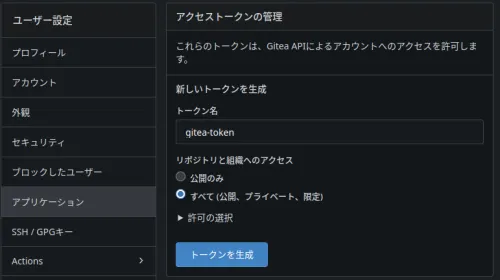
API密钥的生成
在Gitea中生成API密钥。
使用curl进行API请求
每次粘贴curl的URL太麻烦了,所以将其函数化。
在.bashrc中添加以下内容
ga() {
  curl -X POST "https://git.domain.tld/api/v1/user/repos" \
  -H "Content-Type: application/json" \
  -H "Authorization: token GITEA_API_TOKEN" \
  -d "{
    \"name\": \"$1\",
    \"private\": $2
  }"
}
加载
source ~/.bashrc
然后执行后报错了。
$ ga test false
{"message":"token does not have at least one of required scope(s), required=[write:user], token scope=write:repository","url":"https://git.domain.tld/api/swagger"}
我给了repository的读写权限,但似乎还需要用户的写权限。
成功了
因此,需要在第二个参数中传递一个布尔值来指示是否为私有仓库,像这样创建仓库
ga testrepo false
但是,这样返回的json值太长了。
只需要remote url的值,所以用jq提取
ga() {
  curl -X POST "https://git.domain.tld/api/v1/user/repos" \
  -H "Content-Type: application/json" \
  -H "Authorization: token GITEA_API_TOKEN" \
  -d "{
    \"name\": \"$1\",
    \"private\": $2
  }" |\
  jq .ssh_url
}
最终
$ ga testa false
  % Total    % Received % Xferd  Average Speed   Time    Time     Time  Current
                                 Dload  Upload   Total   Spent    Left  Speed
100  2227    0  2180  100    47   2471     53 --:--:-- --:--:-- --:--:--  2524
"ssh://git@git.domain.tld:port/haturatu/testa.git"
像wget之类的进度显示可以通过选项关闭,但是通过管道传递时,这种进度显示要怎么关闭呢?