想在 CLI 上建立 Gitea 儲存庫
您好,我是無能。
我想在推送到 Github 的同時也推送到 Gitea,但這很麻煩,所以我想從 CLI 操作。
這是因為我並不是將所有內容都作為 Github 的鏡像進行鏡像,只是想讓推送變得更容易一些。
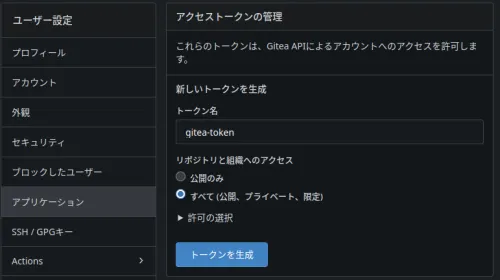
發行 API 金鑰
在 Gitea 中發行 API 金鑰。
使用 curl 進行 API 請求
每次貼上 curl 的 URL 太麻煩了,所以將其函數化。
在.bashrc中寫入以下內容
ga() {
  curl -X POST "https://git.domain.tld/api/v1/user/repos" \
  -H "Content-Type: application/json" \
  -H "Authorization: token GITEA_API_TOKEN" \
  -d "{
    \"name\": \"$1\",
    \"private\": $2
  }"
}
載入
source ~/.bashrc
然後執行時出錯了。
$ ga test false
{"message":"token does not have at least one of required scope(s), required=[write:user], token scope=write:repository","url":"https://git.domain.tld/api/swagger"}
我給了儲存庫的讀取和寫入權限,但似乎也需要使用者的寫入權限。
成功了
因此,需要在第二個參數中傳遞一個布林值來表示是否為私有儲存庫,所以像這樣建立儲存庫
ga testrepo false
但是,這樣的話,JSON 返回的值太長了。
只需要 remote url 的值,所以用jq提取。
ga() {
  curl -X POST "https://git.domain.tld/api/v1/user/repos" \
  -H "Content-Type: application/json" \
  -H "Authorization: token GITEA_API_TOKEN" \
  -d "{
    \"name\": \"$1\",
    \"private\": $2
  }" |\
  jq .ssh_url
}
最終結果
$ ga testa false
  % Total    % Received % Xferd  Average Speed   Time    Time     Time  Current
                                 Dload  Upload   Total   Spent    Left  Speed
100  2227    0  2180  100    47   2471     53 --:--:-- --:--:-- --:--:--  2524
"ssh://git@git.domain.tld:port/haturatu/testa.git"
像wget這樣的進度顯示可以透過選項關閉,但是當透過管道傳遞時,這個進度顯示要怎麼關閉呢?