我使用方便的 mdbook 的方法 - 附帶 doctoc -
您好,我是無能。在工作中,Rust 官方用於文件創建的Markdown格式編寫的mdbook使用體驗非常好,因此我將介紹我的使用方法。
安裝
使用cargo install安裝
cargo install mdbook
為了之後用於生成目錄,安裝doctoc。
sudo npm -g install doctoc
老實說,應該還有其他可以自動生成 Markdown 目錄的指令,但我研究不足。
初始設定
只需執行mdbook init
~/git/lets-mdbook$ mdbook init

Do you want a .gitignore to be created? (y/n)
y
What title would you like to give the book?
test
2024-11-23 22:19:57 [INFO] (mdbook::book::init): Creating a new book with stub content

All done, no errors...] (alleycat:[haturatu]:~/git/lets-mdbook$ mdbook init

Do you want a .gitignore to be created? (y/n)
y
What title would you like to give the book?
test
2024-11-23 22:19:57 [INFO] (mdbook::book::init): Creating a new book with stub content

All done, no errors...
alleycat:[haturatu]:~/git/lets-mdbook$ ls
book  book.toml  src
在這裡,將作為文章的.md文件放入src目錄中,然後進行構建,預設會輸出到book目錄。
alleycat:[haturatu]:~/git/lets-mdbook/src$ ls
SUMMARY.md  chapter_1.md](alleycat:[haturatu]:~/git/lets-mdbook$ cat src/
SUMMARY.md    chapter_1.md
alleycat:[haturatu]:~/git/lets-mdbook$ cat src/SUMMARY.md
# Summary

- [Chapter 1](./chapter_1.md)
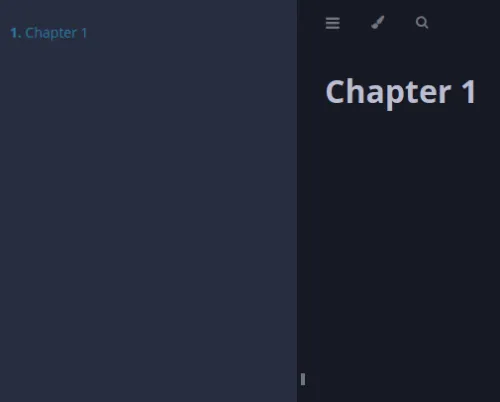
在src/SUMMARY.md中,可以創建顯示在側邊欄的目錄。
使用 Shell 腳本自動化構建作業並創建更新歷史記錄
每次更新src目錄時,都要執行doctoc命令然後mdbook build... 這種愚蠢的事情,我自己都覺得太蠢了... 我實在受不了了,因此創建了一個 Shell 腳本,即使在打開vim的情況下也能執行一系列操作。
#!/bin/bash

pwd | grep "src$" || cd src
doctoc .
sed -i "3d" ./*.md
sed -i "/](\#/d" ./SUMMARY.md
sed -i "8a`date`" ./update.md
cd ..

mdbook build
git add .
git commit -m "wip"
git push
這段代碼pwd | grep "src$" || cd src的意思是,如果pwd的結果包含src,則不執行任何操作。如果沒有,則移動到cd src。之所以這樣做,是因為在編輯src/*.md時,如果使用:!../build.sh執行此腳本,它會在src目錄中執行cd,這讓我感覺有點不舒服,所以才這樣做。不過,即使不這樣做,操作上也沒有任何問題... 另外,這假設已經設定了git remote-url並執行過一次git push,而update.md的內容如下。
<!-- START doctoc generated TOC please keep comment here to allow auto update -->
<!-- DON'T EDIT THIS SECTION, INSTEAD RE-RUN doctoc TO UPDATE -->

- [Update Log](#update-log)

<!-- END doctoc generated TOC please keep comment here to allow auto update -->

# Update Log
2024年 11月 23日 土曜日 22:39:24 JST
使用sed -i "8adate" ./update.md會在第 8 行留下此腳本執行時的日誌。
老實說,如果做得更完善,應該從git commit的返回值判斷只有在有提交時才將其記錄到更新歷史中,這樣會更友善,但這是一個臨時腳本,請諒解...。
使用 Github Actions 不就好了嗎?
這個構建作業實際上也可以在Actions中使用。
但是,如果在無法使用uses引用其他yml資產的環境中會怎麼樣呢?
如果只在Github Actions中使用可能沒問題,但如果將GitLab作為Git伺服器使用,嘗試使用github.com的資產似乎會變得有點複雜(這也是理所當然的...),所以我選擇了這次的方法。
實際上,Github 的企業版在這方面相當麻煩...
關於在 Enterprise 中使用 Actions
因此,我不能太依賴它... 我這麼想著,於是將更不可靠的自己寫進了 Shell 腳本中...。