How to create a repository on Gitea via CLI
Hello, I'm incompetent.
I want to push to Gitea while pushing to Github, but it's troublesome, so I want to be able to operate it from the CLI.
The reason is that I'm not mirroring everything as a Github mirror; I just want to be able to push somewhat easily.
Issuing an API Key
Issue an API key in Gitea.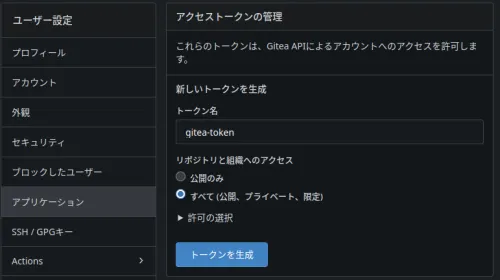
API Request with curl
Pasting the curl URL every time is too much of a hassle, so I'll make it a function.
Add the following to .bashrc
ga() {
  curl -X POST "https://git.domain.tld/api/v1/user/repos" \
  -H "Content-Type: application/json" \
  -H "Authorization: token GITEA_API_TOKEN" \
  -d "{
    \"name\": \"$1\",
    \"private\": $2
  }"
}
Source it
source ~/.bashrc
And when I executed it, I got an error.
$ ga test false
{"message":"token does not have at least one of required scope(s), required=[write:user], token scope=write:repository","url":"https://git.domain.tld/api/swagger"}
I granted read and write permissions for the repository, but it seems user write permission is also required.
It worked
So, I need to pass a boolean value for whether it's a private repository as the second argument, and I'll create the repository like this.
ga testrepo false
However, the value returned in JSON is too long.
I only need the remote URL value, so I'll extract it with jq
ga() {
  curl -X POST "https://git.domain.tld/api/v1/user/repos" \
  -H "Content-Type: application/json" \
  -H "Authorization: token GITEA_API_TOKEN" \
  -d "{
    \"name\": \"$1\",
    \"private\": $2
  }" |\
  jq .ssh_url
}
Finally
$ ga testa false
  % Total    % Received % Xferd  Average Speed   Time    Time     Time  Current
                                 Dload  Upload   Total   Spent    Left  Speed
100  2227    0  2180  100    47   2471     53 --:--:-- --:--:-- --:--:--  2524
"ssh://git@git.domain.tld:port/haturatu/testa.git"
You can turn off the progress display for things like wget with an option, but how do you turn off this progress display when piping?