I want to use a 64GB USB with Ventoy as a multi-OS boot USB ~Benchmark of a 500 yen 64GB USB~
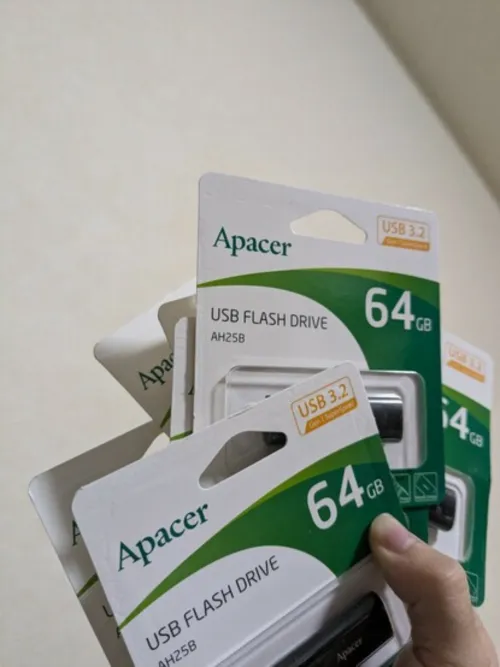
It was really cheap, so I impulsively bought 8 64GB USBs.
I gave one to a friend at a bar.
A 500 yen 64GB USB 3.2, an unbelievably cheap deal. I originally planned to buy about 20 8GB USBs to use as boot USBs, but it turned out to be mysteriously more expensive.
Perhaps thanks to technologies like QLC and increased stacking capacity on a single chip, the manufacturing cost for these is lower.
And if 1 USB = 64GB, I can create partitions equivalent to 8GB USBs, so I can create boot USBs for 8 OSes, so I'll try it. Then I found Ventoy, which is incredibly convenient, allowing you to create a boot USB that can directly boot images like .iso, .wim, .img, .vhd, .efi, so I'll give it a try.
Benchmark Results with Kdiskmark
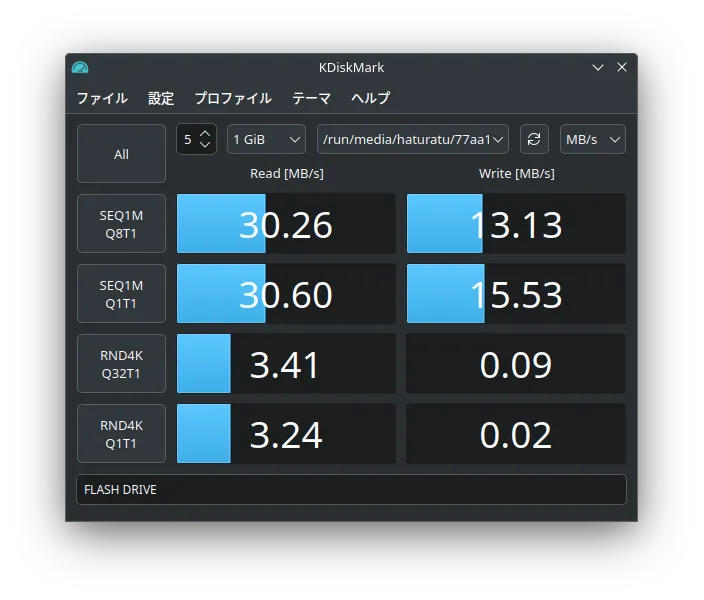
Since it's a ThinkPad X1 Carbon Gen1, I don't think it supports USB 3.2... But it's sufficient.
First, delete existing partitions with fdisk
Just in case, I'll delete it once beforehand. Check USB with lsblk
alleycat:[haturatu]:~$ lsblk
NAME   MAJ:MIN RM   SIZE RO TYPE MOUNTPOINTS
sda      8:0    0 238.5G  0 disk
└─sda1   8:1    0 238.5G  0 part /var/lib/docker
                                 /
sdb      8:16   1  57.8G  0 disk
└─sdb1   8:17   1  57.7G  0 part
OK, let's partition /dev/sdb with fdisk

alleycat:[haturatu]:~$ sudo fdisk /dev/sdb
Welcome to fdisk (util-linux 2.40.2).
Changes will remain in memory only, until you decide to write them.
Be careful before using the write command.


Command (m for help): d
Selected partition 1
Partition 1 has been deleted.

Command (m for help): g
Created a new GPT disklabel (GUID: 721B56AA-A914-48DA-AC42-AE1CCAF41105).
The device already contains a 'dos' signature, which will be erased by a write command. See the fdisk(8) man page and the --wipe option for more information.

Command (m for help): n
Partition number (1-128, default 1): 1
First sector (2048-121145310, default 2048):
Last sector, +/-sectors or +/-size{K,M,G,T,P} (2048-121145310, default 121143295):

Command (m for help): w
The partition table has been altered.
Calling ioctl() to re-read partition table.
Syncing disks.

alleycat:[haturatu]:~/img$ lsblk
NAME   MAJ:MIN RM   SIZE RO TYPE MOUNTPOINTS
sda      8:0    0 238.5G  0 disk
└─sda1   8:1    0 238.5G  0 part /var/lib/docker
                                 /
sdb      8:16   1  57.8G  0 disk
└─sdb1   8:17   1  57.8G  0 part
alleycat:[haturatu]:~/img$ sudo mkfs.ext4 /dev/sdb1
Done.
Creating a boot USB with Ventoy
Download and creating the boot USB
wget https://github.com/ventoy/Ventoy/releases/download/v1.0.99/ventoy-1.0.99-linux.tar.gz
tar xvzf ventoy-1.0.99-linux.tar.gz
cd ventoy-1.0.99
sudo ./Ventoy2Disk.sh -i /dev/sdb

**********************************************
      Ventoy: 1.0.99  x86_64
      longpanda admin@ventoy.net
      https://www.ventoy.net
**********************************************

Disk : /dev/sdb
Size : 57 GB
Style: MBR


Attention:
You will install Ventoy to /dev/sdb.
All the data on the disk /dev/sdb will be lost!!!

Continue? (y/n) y

All the data on the disk /dev/sdb will be lost!!!
Double-check. Continue? (y/n) y

Create partitions on /dev/sdb by parted in MBR style ...
Done
Wait for partitions ...
partition exist OK
create efi fat fs /dev/sdb2 ...
mkfs.fat 4.2 (2021-01-31)
success
Wait for partitions ...
/dev/sdb1 exist OK
/dev/sdb2 exist OK
partition exist OK
Format partition 1 /dev/sdb1 ...
mkexfatfs 1.3.0
Creating... done.
Flushing... done.
File system created successfully.
mkexfatfs success
writing data to disk ...
sync data ...
esp partition processing ...

Install Ventoy to /dev/sdb successfully finished.
~~~
lsblk
NAME   MAJ:MIN RM   SIZE RO TYPE MOUNTPOINTS
sda      8:0    0 238.5G  0 disk
└─sda1   8:1    0 238.5G  0 part /var/lib/docker
                                 /
sdb      8:16   1  57.8G  0 disk
├─sdb1   8:17   1  57.7G  0 part /run/media/haturatu/Ventoy
└─sdb2   8:18   1    32M  0 part
Oh... now the boot USB is ready.
As a test, I moved the Artix Linux and FreeBSD images to /run/media/haturatu/Ventoy using mv.
mv FreeBSD-14.1-RELEASE-amd64-memstick.img /run/media/haturatu/Ventoy
mv artix-plasma-openrc-20240930-x86_64.iso /run/media/haturatu/Ventoy
Now, if this USB can boot, it's all good.
Wow... I know I'm only 23, so I shouldn't be saying this, but it's a really great era.
The write speeds in the USB 2.0 era were ridiculously slow, and I never thought an era where a 64GB USB could be bought for under 1000 yen would arrive before I turned 25... Honestly, I was planning to buy about 20 8GB USBs in bulk, but I'm glad I didn't.
That's all for now. Thank you.