Upgrading FreeBSD directly from 13.2 to 14, and as a bonus, booting from a custom ISO on Vultr - Onomatopoeia
Hello, I'm incompetent.
The reputation of FreeBSD 14 is quite good, so I thought I'd upgrade to it all at once.
First, when I tried to freebsd-upgrade to 13.3, for some reason, it failed with fsck every time at boot, and I couldn't get out of Read Only mode, and even running fsck in single-user mode didn't change anything.
Moreover, ping didn't work, and curl reported missing libraries. It seemed like the network also didn't work at boot.
Next, it seems Vultr can boot a custom ISO as a separate partition, so I booted FreeBSD from there, but even after fsck-ing the problematic FreeBSD partition, nothing changed.
As part of the FreeBSD boot process, if fsck fails, it seems to continue in single-user mode, so I had to run mount -o rw / before proceeding with any work.
Finally, since I failed trying to upgrade to 13.3, I decided to just go straight to 14! The reason the network was somehow disconnected due to the failure was that I once checked with ifconfig
 and confirmed it was vtnet0, so I tried running
 dhclient vtnet0 to re-acquire an IP via DHCP, and the network connected (I wonder when the content of resolv.conf changed?). So, I relied on the following site and followed the article, and everything went through without any problems.
https://www.takatono.info/article/144
However,
Basically, delete the lines from "<<<<<<< current version" to "=======" and also delete the line ">>>>>>> xx.x-RELEASE".
However, you need to properly confirm whether it's okay to delete them.
This part might not be very good.
Since you'll be modifying the contents of each config file, if you follow this article exactly, almost all of your pre-update settings will be lost, so you need to properly check the necessary parts and edit them using a vi editor.
Including the subsequent pkg upgrade, everything went according to the article, and it was very helpful because it was written concisely.
As an aside, Vultr's support team
This time, after about 2 hours, I finally sought help from Vultr itself.
When I asked if there was any way to fix it since fsck itself was failing, they told me about the custom ISO boot feature I mentioned at the beginning.
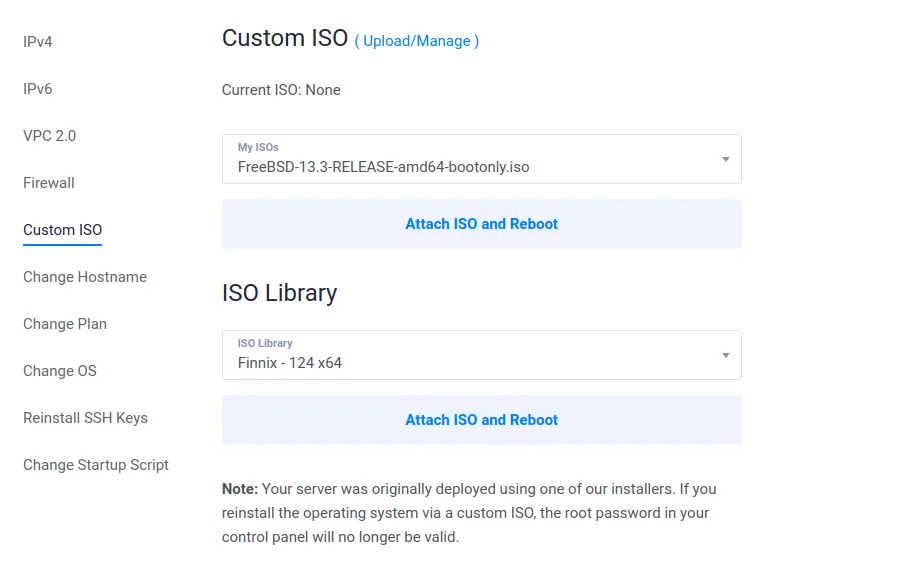 I was told to use a Debian-based rescue OS like Finnix, which is included in Vultr's standard images, to run fsck. However, between BSD fsck and GNU/Linux fsck, the GNU/Linux version, if run directly, would recognize the filesystem as ext2/3/4 and wouldn't recognize FreeBSD's UFS filesystem itself.
So, the lesson learned this time is that you can boot from a custom ISO on Vultr. For the record, this custom ISO boot itself is launched on the same instance, so simultaneous booting of two OSes is not possible. It should be easy to understand if you imagine it like booting from a USB drive.
However, if this can be used, I can imagine selecting the entire disk and bringing the image to my home server via scp, which might mean I don't have to use the paid backup option.
I was surprised by how quickly Vultr's support responded, sometimes within about a minute.
Somehow, seeking comfort, I asked, "This is just an aside, and you don't have to answer if you don't want to, but it's 3:40 AM in Japan right now. What time is it there?" and after that, the incredibly fast replies completely stopped.
So, with a punchline delivered, that's all for today.
See you next time.